Files
Everything on the target's storage moves over ftpsrv
(port 2121): single files, whole folders, titles, saves and packages.
The commands here work anywhere on the target; the sections in library and titles are the
same operations pointed at the places those things live.
Command line
| Command | Does |
|---|---|
pros ls [path] |
list a directory on the target (default /data) |
pros pull <path> [--into <file>] |
fetch one file; written under its own name unless
--into is given |
pros push <file> <path> |
put one local file at a path on the target |
pros backup <folder> [--into <dir>] |
copy a folder off the target, recursively |
pros restore <dir> <folder> |
copy a local folder onto the target, recursively |
pros ls      /data/homebrew
pros pull    /data/report.txt --into ./report.txt
pros push    ./payload.elf /data/payload.elf
pros backup  /data/homebrew/GLCB00001 --into ./GLCB00001
pros restore ./build/title/GLCB00001 /data/homebrew/GLCB00001
Each file is printed as it goes, then a total.
Incomplete copies
A folder copy that skipped anything lists every skipped file with the
reason, says
this copy is incomplete - do not treat it as a backup, and
exits 1. One unreadable file does not end the walk. Links are not
followed, and appear in the skipped list.
A restore puts files where it is told and does not merge or interpret
them; backup and restore move bytes and
understand no save format.
Unchanged files
A restore does not re-send a file it already put there unchanged. It
records what it verified landing on each target
(deployed.json), and skips a file whose local bytes match
that record and which the target still lists. The output counts these as
already there, unchanged - not re-sent, so a rebuild that
changed one file sends one file. A changed file, or one the target has
lost, is always sent. --all sends every file, for when the
record cannot be trusted, such as a target reinstalled behind the same
name. (D034)
Destinations the target ignores
A title restored under /user/app lands and is then never
mounted, so it never appears on the home screen.
pros restore refuses that destination and suggests
/data/homebrew/<id>, the folder the target scans,
under the title's own identifier:
| Flag | Does |
|---|---|
| (none, at a terminal) | shows the refusal and asks whether to use the suggested path |
-y, --yes |
uses the suggested path without asking |
--force |
copies to the requested path anyway |
pros push to /user/app warns and
copies.
Window
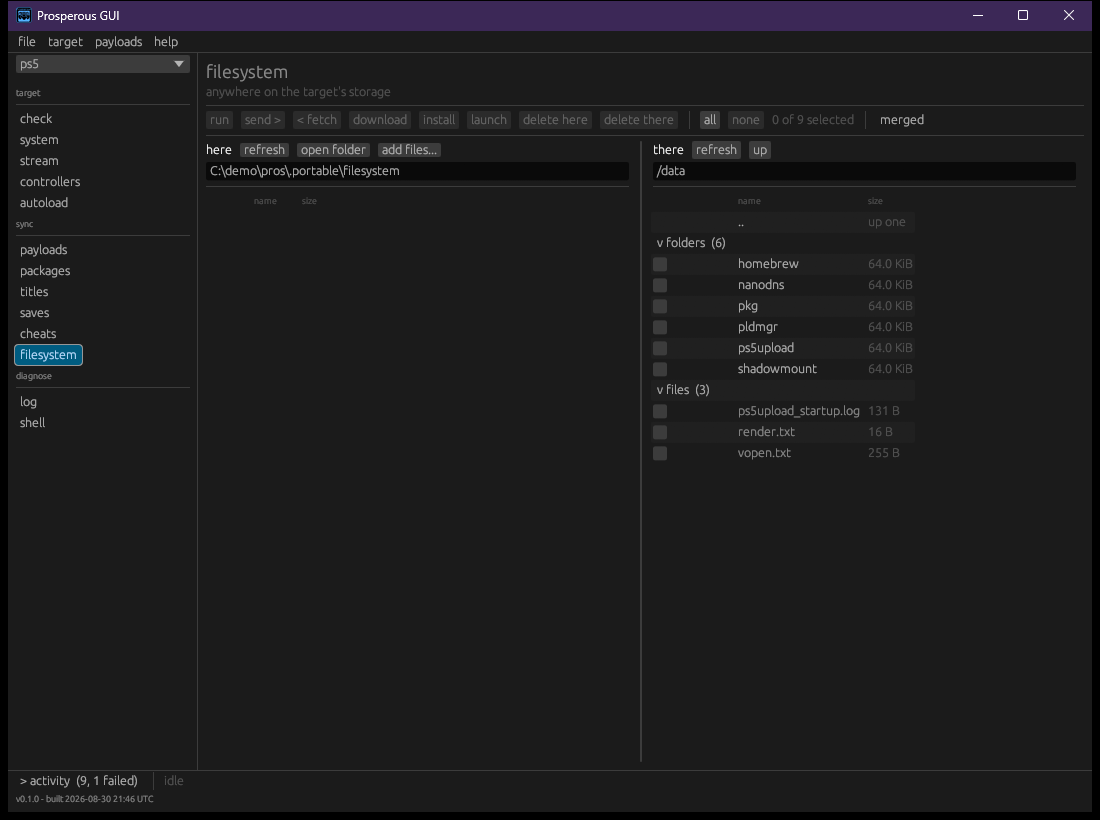
The filesystem section browses anywhere on the target. Like every sync section it has two panes: here on the left is a folder on this machine, there on the right is a folder on the target.
| Control | Does |
|---|---|
| path boxes | type a path and press Enter to go there |
| device list (there) | choose internal storage or a removable device, and a known place on it |
| up | go to the parent folder |
| refresh | list the side again |
| open folder (here) | show this machine's folder in the file browser |
| add files... (here) | copy files from anywhere on this machine into this folder |
| merged | one list with a column for each side, instead of two panes |
| all / none | tick everything listed, or nothing |
Actions apply to every ticked row, and a disabled one says why on hover:
| Action | Does |
|---|---|
| send > | copy the ticked items onto the target, into the folder the right pane shows |
| < fetch | copy the ticked items to this machine |
| launch | start an installed title by identifier (titles) |
| install | install a package (library) |
| delete here / delete there | remove the ticked items from one side, after a confirmation; not undoable |
Sending a title to an ignored destination stops with the same refusal
as the command line, offering Use '/data/homebrew/
A long copy shows its progress in the bottom bar; stop there finishes the file in flight, then stops and reports what was left.