Titles
A title is an application installed on the target, known by its
identifier: nine characters, four letters then five digits, such as
GLCB00001. Launching one asks the target's own system
service to start it, the way the home screen does; no file crosses the
link. Running an ELF from this machine is a different thing, described
in payloads.
Launching, process control and the probe loop go through the shell
service, shsrv.
Installed titles
pros titles --name living-roomLists each installed title by identifier, version and name, read from
/user/appmeta. A title whose description cannot be read
shows its identifier, ? and the reason.
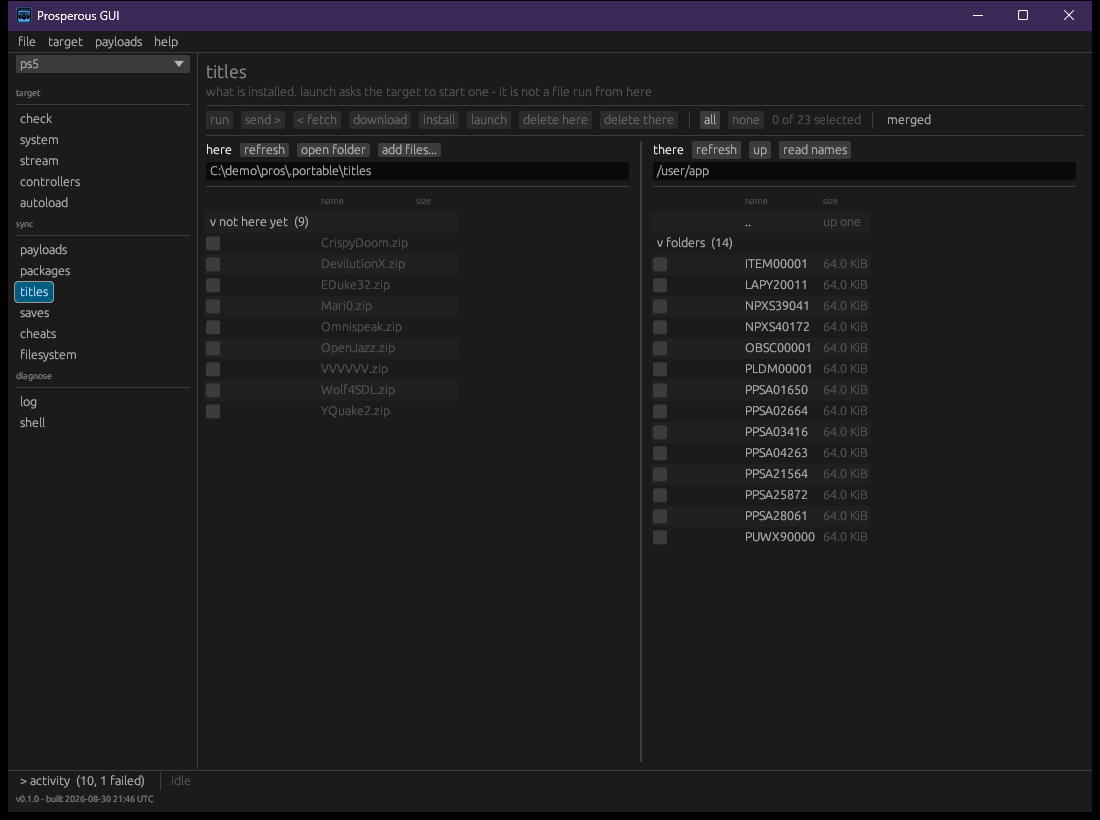
The titles section shows this machine's
titles/ folder on the left and /user/app on
the target on the right, with the actions described in files. read names asks the target
what each listed title is called, and launch starts the
ticked ones.
Launching and closing
| Command | Does |
|---|---|
pros launch <id> |
ask the target to start an installed title |
pros close <id> |
end every process the title owns |
pros restart-ui |
restart the user interface to clear a softlock, without a reboot |
pros launch refuses anything that is not an identifier,
since the target would pass stray words to the title as arguments. It
then reads the target's reply: exit 0 means the target accepted the
request, which is not the same as the title having started; exit 1 means
the target refused it, and the reason is printed.
pros close wakes a stopped process before ending it, so
its exit teardown runs and leaves no locked files. Afterwards it lists
the processes again and says whether the title is gone or still listed,
exiting 1 if it is still there.
pros restart-ui ends SceShellUI by name and
nothing else. SceSysCore starts it again, so the screen
comes back on its own.
A finished big-app parks rather than exits, and a parked big-app
ignores every signal. close cannot end one; the target's
own dashboard close does. While one is parked it holds the application
slot, and the next launch is refused.
Processes
| Command | Does |
|---|---|
pros ps |
list the running processes |
pros top [--every <s>] [--seconds <s>] |
the same list, redrawn every 2 seconds (or --every)
until Ctrl-C or the --seconds cap |
pros kill <pid> |
end one process by pid |
The columns are PID, STATE,
MEM, TITLE and COMMAND.
MEM is the figure the target's own ps prints,
in MiB in use; a process with no figure shows -. There is
no CPU column because the target reports none.
top is read-only. On a terminal it clears between draws;
piped to a file it prints one table after another. A read that fails is
reported and the watch continues.
kill is for what close cannot name: a
payload, a stuck process, anything without a title. It sends the signal
in the form the target's kill builtin accepts, wakes a
stopped process first, and says afterwards whether the pid is gone.
In the window, the system section (targets) lists the running processes, titles first:
| Control | Does |
|---|---|
| close on a title | the same as pros close |
| everything else | the other processes, folded |
| end on a process | the same as pros kill |
| restart UI | the same as pros restart-ui |
| sort | as listed, by memory, or by state, within each group |
| auto-refresh | re-read the target every 3 seconds while the section is open; off by default |
Each row shows the memory in use, with the peak on hover. After any action the list is read again, so it shows what is running now.
The probe loop
Deploying a homebrew build, running it and reading what it prints is one command:
pros probe GLCB00001 ./build/title/GLCB00001
pros probe GLCB00001 ./build/title/GLCB00001 --seconds 90   # follow for at most 90 s (default 120)
pros probe GLCB00001 ./build/title/GLCB00001 --all          # send every file, not just changed ones
In order, it:
- closes the title if it is running (best effort, as above)
- restores the build folder into
/data/homebrew/<id>, skipping unchanged files as a restore does (files); a restore that does not land cleanly stops here - waits up to a minute for the target to register the title, since the files are on disk before the target has mounted them
- attaches to the log, then launches, so nothing the title prints at start is lost
- prints each log line until the title parks (prints its park line),
exits, or the
--secondscap passes
A launch that is refused stops the loop and names the likely cause: a parked title holding the slot.
The window's probe section runs the same loop for a title already installed, without the restore: choose a title, set how long to follow (for), and press launch and capture. stop stops following and leaves the title running. The capture has the log section's filter, copy and save (logs); refresh re-reads the installed titles.