Payloads
A payload is an ELF sent to the target's loader, elfldr
(port 9021), which runs it from memory until the next power cycle.
Prosperous describes payloads, verifies them and delivers them; it ships
none.
The manifest
What Prosperous carries is a manifest: each payload's name, version, where it is published, its SHA-256 digest and what it is for. It follows the payload manager's own schema, so a target that already has a configured manager can be read as the source.
Three manifests can be in play:
| Manifest | Where |
|---|---|
| the built-in list | inside the program, used when you have none of your own |
| yours | payloads.json in the data directory (getting started) |
| the target's | /data/pldmgr/repository_cache.json, read with
--from-target |
pros payloads                     # what your list (or the built-in one) describes
pros payloads --from-target       # what the target's own repository describes
pros payloads --from-target --check
pros payloads --write             # write the built-in list out as payloads.json, to edit
pros payloads --from-target --save  # merge what was read into payloads.json
--write never overwrites an existing
payloads.json. --check also probes the
target:
off  2 here   elfldr           0.30       send it a payload, it runs it
?    -      ! SomePayload      -          mounts things

columns: running / boot-list position / staged here / verifiable| Column | Values |
|---|---|
| running | on, off, or ? when no port
this project knows identifies it; ? is not
off |
| boot-list position | its place in /data/pldmgr/autoload.txt, -
when absent, ? when the list could not be read |
| staged here | here when a verified copy is in the data directory's
payloads/ |
| verifiable | ! when the entry cannot be checked; those are listed
with the reason at the end |
A service can be answering now and be absent from the boot list. It is then gone after the next restart.
Fetching and staging
Nothing unverified is kept or sent.
pros fetch elfldr --from-target      # download one, using the target's urls and digests
pros fetch --all                     # everything described that is not here yet
pros stage ./elfldr.elf --as elfldr  # keep a file you already have, checked on the way in
pros verify ./elfldr.elf --against elfldr --manifest ./payloads.json- A payload with no usable checksum is refused before anything is downloaded.
- A download that fails its digest is discarded; the message names the
expected and found digests, and
fetchexits 1. stagechecks the file against its manifest entry before copying it intopayloads/.verifychecks a file without keeping it.
Downloads run
curl -fL --silent --show-error --output {into} {url}. To
use another program, put one line in fetch.txt in the data
directory, with {url} and {into} where the
address and destination go.
Sending
pros send ./payload.elf              # send it and listen 10 seconds for what it prints
pros send ./payload.elf --seconds 30
send checks the file's shape first and refuses one the
loader would accept and then fail to run, such as a signed module,
naming what the file is. Silence on the socket is not failure: only a
payload launched this way reports there, and one that writes a file can
be read back with pros pull (files).
pros check --fix sends every missing service that is
staged here (targets).
Supervising
pros supervise ./probe.elf --port 9803Keeps a probe alive on the target while something else drives it. It watches the probe's port about once a second and, when it stops answering, sends the same file again. Every change is printed.
| Flag | Default | Meaning |
|---|---|---|
--port |
9803 | the port the probe listens on once up |
--patience |
3 | dead starts in a row before giving up (exit 1) |
--restarts |
0 | stop after this many restarts; 0 keeps going |
Window: payloads
The payloads section pairs a table of described
payloads on the left with the target's payload folder,
/data/pldmgr/payloads, on the right. The table shows each
payload's version, size, whether it is running, its boot-list position
and whether it is on the target.
| Control | Does |
|---|---|
| run | send a copy on this machine to the loader, or start one that is only on the target through the shell |
| send > | write the payload onto the target's disk, in its own folder with a
.json beside it, the layout the manager reads |
| download | fetch it from where the list says it is published, verified, into
this machine's payloads/; update when an
older version is already here |
| < fetch, delete here, delete there | as in files |
| run from file... | choose any ELF and run it |
| check sources | ask each payload's project for its latest release, so the version column shows whether the list is current |
| open folder, re-read | show or re-list this machine's payloads/ folder |
run loads a payload into memory now; send > puts a file on a disk.
A file dropped on the window whose name matches a described payload is verified and staged. One that matches nothing, such as a local build, is offered with run it now or keep in payloads; its shape is still checked before it is sent.
Window: autoload
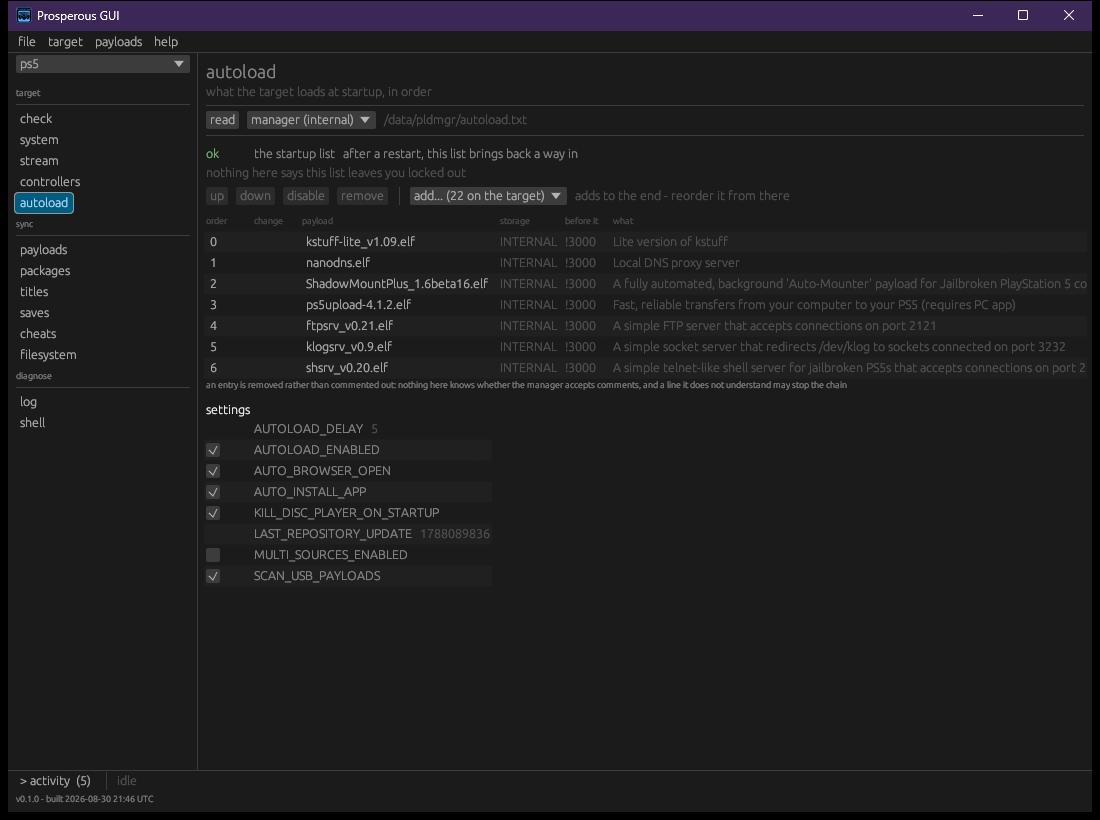
The autoload section shows what the target loads at
startup, in order, from /data/pldmgr/autoload.txt, and the
payload manager's settings. The list chooser also offers startup lists
on removable storage, read only. read reads them
again.
An edit is never written directly. It is marked in the list as
not written yet, with the whole file as it will be written
under the file as it will be written, and the result is
audited before it goes. write it sends the file; when
the audit finds something grave the button reads write it
anyway, beside fix these N first. A wrong
startup list can leave the target without its loader or file service,
and recovery is running the entry point by hand again.
export chain... writes the current list down as a chain preset of your own, to deploy to another target or to this one after something breaks it (targets).