Getting started
Prosperous manages a target: a Prospero-generation machine running the homebrew services, or orbistoun. It registers the target, asks what it can do, moves files, runs payloads and titles, and reads its log. This page goes from a download to a target that answers.
The two programs
The releases page carries an archive for Windows, Linux and macOS. It holds two programs:
| Program | What it is |
|---|---|
pros |
the command line |
pros-gui |
the window |
Both do the same things with one exception: installing a package is in the window only (library). Nothing is installed on this machine, and nothing is written outside the data directory below, so removing Prosperous is deleting its folder.
pros --help lists every command, and
pros <command> --help its flags. In the window,
help > documentation... opens this guide.
Where things are kept
Everything lives in the collection's shared data directory, so a target registered here is the same target orbistoun and obSCEne reach:
| Platform | Directory |
|---|---|
| Windows | %APPDATA%\OOPS |
| Linux | ~/.local/share/OOPS |
| macOS | ~/Library/Application Support/OOPS |
| File or folder | Holds |
|---|---|
targets.txt |
the registered targets (targets) |
payloads.json |
your payload manifest, when you have one (payloads) |
payloads/ |
payloads fetched or staged here, each verified |
deployed.json |
what each restore verified landing, so an unchanged file is not sent twice (files) |
fetch.txt |
the download command, when you replace the default |
logs/<target>.log |
every log line the window has followed (logs) |
titles/, saves/, packages/,
cheats/, filesystem/ |
this machine's side of each window section |
PROSPEROUS_DATA_DIR or OOPS_DATA_DIR names
another directory.
Portable mode
A portable run keeps everything in a .portable folder
beside the programs instead. It is on when any of these holds:
- a
.portabledirectory sits besideprosorpros-gui PROSPEROUS_PORTABLEorOOPS_PORTABLEis1,true,yesoron- the program's file name contains
portable
The services on the target
Prosperous speaks to services already running on the target and adds none of its own.
| Service | Port | What it unlocks | Required |
|---|---|---|---|
elfldr |
9021 | send a payload to the target and run it | yes |
ftpsrv |
2121 | retrieve reports, stage payloads and packages | yes |
klogsrv |
3232 | read the system's own log - why a payload died, not just that it did | no |
shsrv |
2323 | run commands on the target without loading a payload | no |
pldmgr |
8084 | inspect and reload the payload chain | no |
A target that uses another port for a service carries an override in its registration (targets).
Every command declares the service it needs. When that service does
not answer within a glance, pros prints a warning naming it
before running the command, and the window explains the missing service
in the section instead of drawing it.
Registering a target
A registration is a name and an address:
pros register 192.168.1.211 --name living-roomIn the window, target > register..., or register... at the bottom of the target list in the sidebar. Registering an existing name again replaces its address and keeps its port overrides, so a typo is corrected by registering again.
With one target registered, --name can be left out of
every command.
Reading a check
pros check --name living-roomliving-room (192.168.1.211)
up elfldr :9021 send a payload to the target and run it
up ftpsrv :2121 retrieve reports, stage payloads and packages
-- klogsrv :3232 read the system's own log - why a payload died, not just that it did (1504ms)
up shsrv :2323 run commands on the target without loading a payload
-- pldmgr :8084 inspect and reload the payload chain (1508ms)
usable, but klogsrv and pldmgr are not loaded, so something will be invisible if a run goes wrong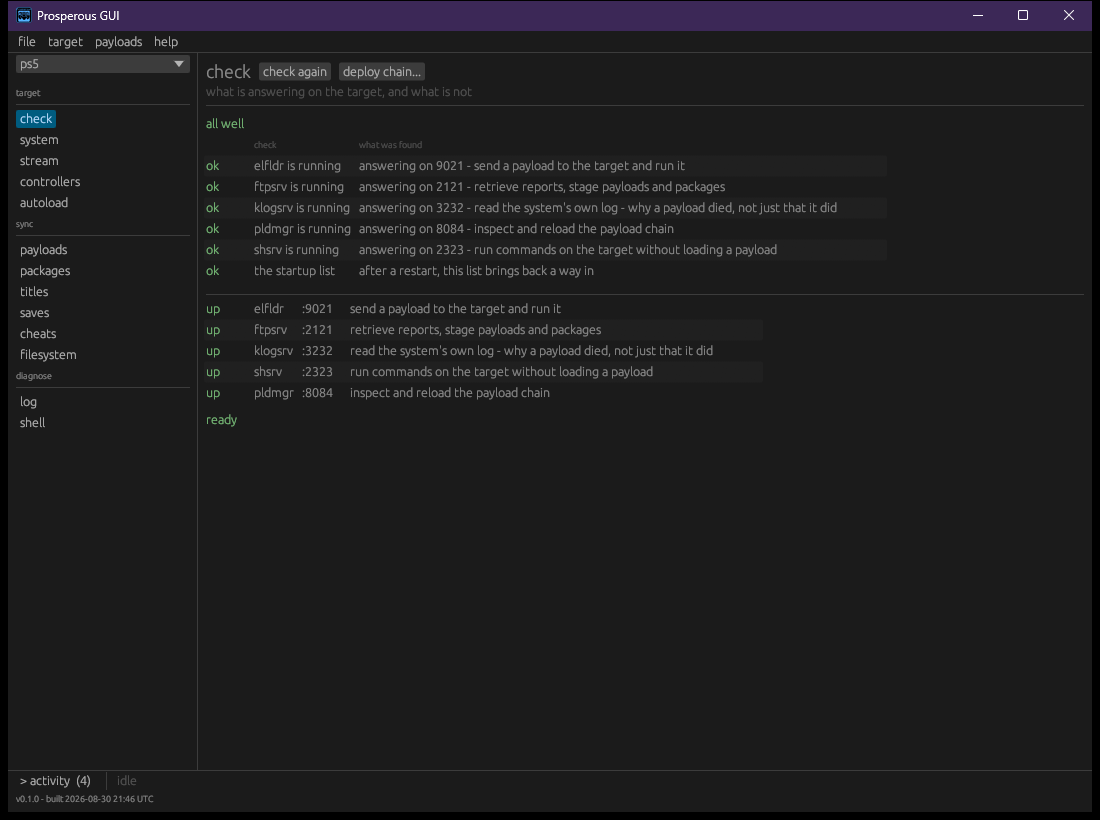
Each row is a service and what it buys. The marks:
| Mark | Meaning |
|---|---|
up |
the service answered |
DOWN |
a required service did not answer |
-- |
an optional service did not answer |
(1504ms) |
the answer took longer than 400 ms: the port did not refuse, it never replied |
A refused port is a service that is not running. A timeout is usually a firewall or a sleeping machine.
The last line is the verdict:
| Verdict | Meaning |
|---|---|
ready |
every service answered |
usable, but ... |
an optional service is missing; the named things are invisible |
the loader is not answering ... |
elfldr is down. Nothing can be sent or started, and the
remedy is to re-run the entry point on the target |
blocked: ... not loaded |
the loader is up and a required service is missing; it can be sent again |
The loader is checked first because its remedy differs from every other failure. Everything down at once means the target is off, asleep, on another network, or has not run the entry point since its last restart; Prosperous cannot tell these apart from outside.
What a target can do is asked every time and never stored, because the entry point does not survive a power cycle.
Exit codes
| Code | Meaning |
|---|---|
| 0 | it worked, or the target answered and the answer was "not ready" |
| 1 | pros could not do what it was asked: no such target, a
missing file, a failed transfer, a title the target refused |
| 2 | a check found the target blocked |
Detail and logging
Every tool in the collection reads OOPS_LOG:
OOPS_LOG=pros_link=trace pros check --name living-roomThe window
The sidebar holds the target list and three groups of sections:
| Group | Sections |
|---|---|
| target | check, system, stream, controllers, autoload |
| sync | payloads, packages, titles, saves, cheats, filesystem |
| diagnose | log, probe, shell |
Choosing a target runs a check and reads the payload folder, the startup list and the system report. The bar at the bottom shows what is running, with a clock, a stop button and the queue; activity opens the record of everything the window has done this session. Stream and controllers are described in the video reference.
Privacy
Prosperous sends no telemetry, has no accounts, and talks to registered targets directly on the local network. It reaches the internet in two cases:
- a payload download, through
curlor the command infetch.txt, when you ask for one - the window asks each described payload's project for its latest release, at launch and on check sources, at most once every six hours per project
Troubleshooting
| Symptom | Cause and remedy |
|---|---|
pros list says no targets registered |
nothing is registered yet;
pros register <address> |
several targets are registered |
pass --name |
| every service is down | the target is off, asleep, unreachable, or has not run the entry
point; ping its address |
| only the loader is down | the entry point was lost to a restart; re-run it |
a command prints a !!! warning first |
the service it needs is not answering; pros check shows
the whole picture |
pros sh prints
no output - is the shell loaded? |
shsrv is not running, or the command printed
nothing |