Library
What is on the target's storage: titles, saves, packages and cheats.
Everything here moves over the file service, ftpsrv.
Copying files and folders in general is in files;
installed titles, launching and closing them are in titles.
Browsing
pros library                    # /user/app
pros library /data/homebrew
pros library /user/app --titles # only what looks like a title
Each entry is shown as title, pkg,
dir or file, with its size and, for a title,
its identifier. The last line is the total; when some entries stated no
size, it says how many the total covers.
Saves
pros savesSaves live under a per-account folder,
/user/home/<user>/savedata_prospero.
pros saves finds that folder and lists each save by the
name of the title it belongs to; a save whose title is no longer
installed shows its identifier and says nothing names it. With several
accounts it lists each account's folder and does not choose between
them.
A save is a folder, copied with pros backup and
pros restore (files):
pros backup  /user/home/<user>/savedata_prospero/GLCB00001 --into ./saves/GLCB00001
pros restore ./saves/GLCB00001 /user/home/<user>/savedata_prospero/GLCB00001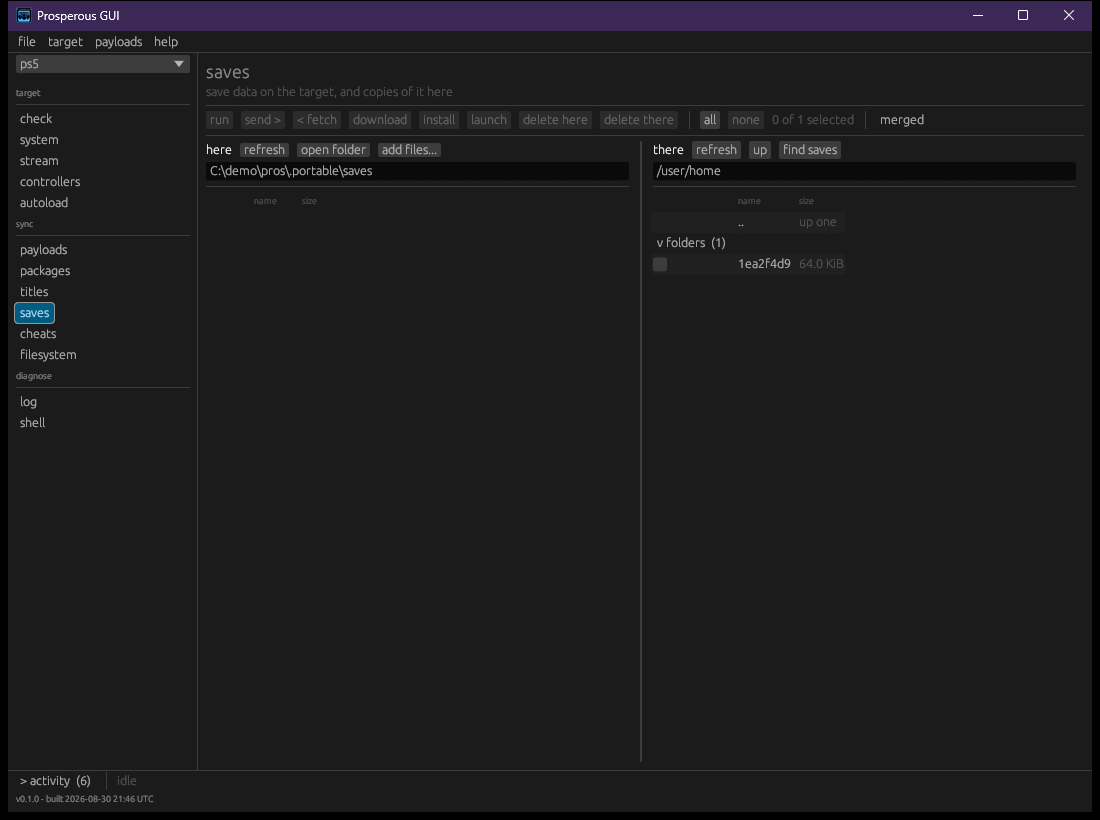
The saves section starts at /user/home;
find saves goes to the account's save folder. A save is
signed for the account that wrote it, so the window checks whose save it
is before sending one into an account folder. A save written by another
account, or one whose owner cannot be checked, is not copied; the panel
says why and offers copy anyway or leave
it.
Packages
The packages section shows this machine's
packages/ folder beside the places packages are kept on the
target, chosen from the device list:
| Place | Path |
|---|---|
| uploads | /data/homebrew/pkg |
| install staging | /data/pkg |
Both folders are made by upload tools on the target, so a target may have either, both or neither.
Installing a package
install is in the window only; pros has
no command for it. Tick the packages on this machine and press
install. A confirmation lists them; after
install each one is held out from this machine for the
target to fetch over HTTP, and the target registers what it finds. After
that it is an installed title, not a file, and nothing here undoes it.
The target's own screen shows whether the installer finishes.
The target connects back to this machine, so this machine's address
must be reachable from the target. When it is not (a virtual machine
behind address translation, for example), the result says
the target never fetched the package.
Cheats
The cheats section shows cheat files on both sides. There is no single standard folder: the cheat runner reads its own and two others, so the window asks the target which of these exist and offers them in the device list:
| Place | Path |
|---|---|
| cheatrunner's own | /data/cheatrunner/cheats |
| etaHEN's | /data/etaHEN/cheats |
| elf-arsenal's | /data/elf-arsenal/cheats |
Tracked lists
The payloads, packages, titles, saves and cheats sections each read a
list of known items alongside the two folders, so something described
and on neither side shows as not here yet, ready for
download. The titles list describes open-source engines
only, and the saves list is empty, since a save is signed for the target
that wrote it.